For the complete documentation index, see llms.txt
For the complete documentation index, see llms.txt
How Many References Do I Need to Add?
You will either be asked to provide a certain number of references and/or provide references to cover a certain amount of years.
This usually is explained within the message from your employer at the top of your submission page or you can find information at the top of the References submission page within the **Requirements** section.

For example, they may require you to provide **3 references** AND/OR references to cover the **last 5 years**.

## Does the coverage need to include my most recent employer?
If your employer asks for references covering the **last 3 years**, the coverage should match that requested time window. It is not enough to provide any earlier employment that adds up to 3 years if it falls outside the requested period.
For example, if the requested period includes your current job, add your current employment to your career history for that period. You can then add previous employers or non-employment periods to cover the rest of the requested window.
Only the referees you provide are contacted. If you are still employed and do not want your current employer contacted yet, check whether you can provide an alternative referee or complete another available verification route for that employment period.
## Do short gaps between jobs count?
Short gaps between roles can affect the total covered time if your employer has requested continuous coverage for a period such as the last 3 years.
If there is a gap in the requested window, add it as a **non-employment period** where the form asks you to account for it. Depending on your employer's requirements and the type of gap, Zinc may ask for supporting documents and/or a character/academic referee for that period.
## Why does it show fewer years than I expected after adding referees?
In some cases, your employer isn’t just asking for a number of referees — they’re asking for references that cover a specific time period (for example, the **last 3 years**).
That “years/months covered” figure is based on the required time window from the current month and year, with any gaps accounted for. Time outside that requested window won’t count toward the requirement.
For example, if an employer requests **3 years** of references in **May 2026**, the requested period would be **May 2023 to May 2026**.
Also note:
- If your referees cover **overlapping** dates, overlapping time won’t increase the total coverage.
- If there are **gaps** between the periods your referees can verify, the total covered time will be lower.
If you’re short on coverage, you may need referees who can verify **longer** periods or **different** (non-overlapping) periods, and you can add **non-employment periods** where needed. Periods such as seeking employment, travelling, studying, or other gaps do not count as employment reference coverage unless they are added in the relevant non-employment section and any requested supporting details are completed.
## If you only have 1 reference but you’re asked for more
If you only have 1 reference but are being asked to input (for example) 3 references, complete the rest of your referencing requirement with **non-employment periods**.
Scroll down to the bottom of the page to add in your period and if requested, add in a referee to verify that period of non-employment.
If you aren''t sure, please contact your employer to confirm what they require for your Reference check.
## If your digital signature isn’t being accepted
If you can’t submit a reference or a period of non-employment because the typed signature isn’t being accepted:
1. Try using a different web browser or device.
2. Above the signature box, look for the text: **“Type your name (YOUR NAME) to sign consent for your references to be collected”**. 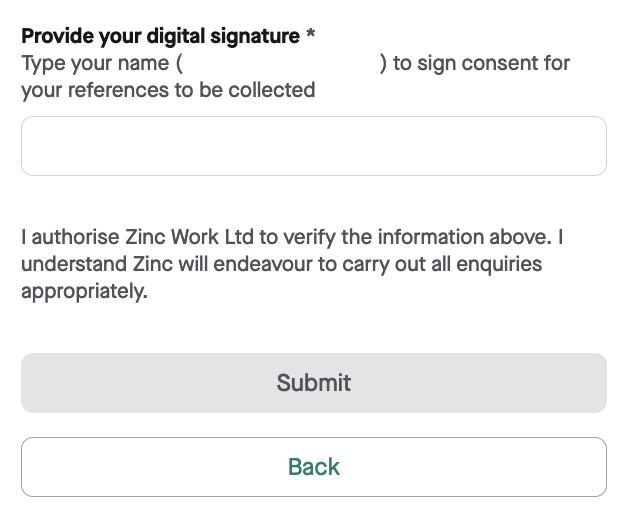
3. **Copy the name inside the parentheses** and **paste it** into the signature box.
Once you paste the name shown in parentheses, the **Submit** button should turn **green** and you should be able to submit.