For the complete documentation index, see llms.txt
For the complete documentation index, see llms.txt
Right to Work Checks
A right to work check verifies that a candidate is legally permitted to work in the country where they will be employed.
In some jurisdictions, such as the UK, employers are legally required to carry out these checks to establish a statutory defence against illegal working penalties.
## How Does It Work with Zinc?
1. Candidates select their nationality and country of employment.
2. We collect key right to work documentation and share codes (UK only) from the candidate.
3. Our identity verification partner, Entrust (formerly known as Onfido), analyses government-issued identity documents such as passports and national ID cards using automated document verification technology. The system checks the visual authenticity of the document, validates key data fields, and confirms that the document format matches known document templates. Where applicable, document numbers may also be screened against databases of known lost or stolen travel documents (such as the UK's Metropolitan Police Amberhill database).
4. A biometric comparison between a live photo of the physical document and a live selfie or seflie video helps confirm that the person submitting the document matches the identity shown on the document.
For a UK Right to Work check where the candidate uses their passport, the live selfie is replaced by a short live motion capture video. Zinc also runs an identity fraud check automatically in the background, which needs no input from you or the candidate.
If a candidate has uploaded a document that is a valid proof of RTW **but cannot be verified digitally**, Zinc serves as a **document collection tool** instead for you to easily manually review provided documentation to ensure it's compliant in your employment country. For example, UK birth certificates and national insurance proof in the UK.
## What's the Difference Between the Right to Work and an Identity Check?
A right to work check verifies a candidate's right to work status in their employment country while the identity check verifies whether a candidate is truly who they say they are and checks government-issued IDs, ensuring the candidate's identity is genuine and accurate.
If, for example, a candidate provides for the UK a share code and a Polish passport, the system will use the **share code** for the **right to work** check and the **identity check** will check the **Polish passport**.
A right to work check assesses whether the evidence provided would likely demonstrate a legal right to work in the employment country. An identity check verifies that the individual is who they claim to be by validating their identity document and biometric match.
The same document may be used for both checks, but the outcome may differ because each check evaluates different criteria.
For example, a residence permit in Portugal may trigger a **Consider** result for the **right to work** check due to restrictions or expiry date on the document but on the **identity** check, it can be a **Clear** result as it's a valid form of identity.
## What Does It Look Like on the Report?
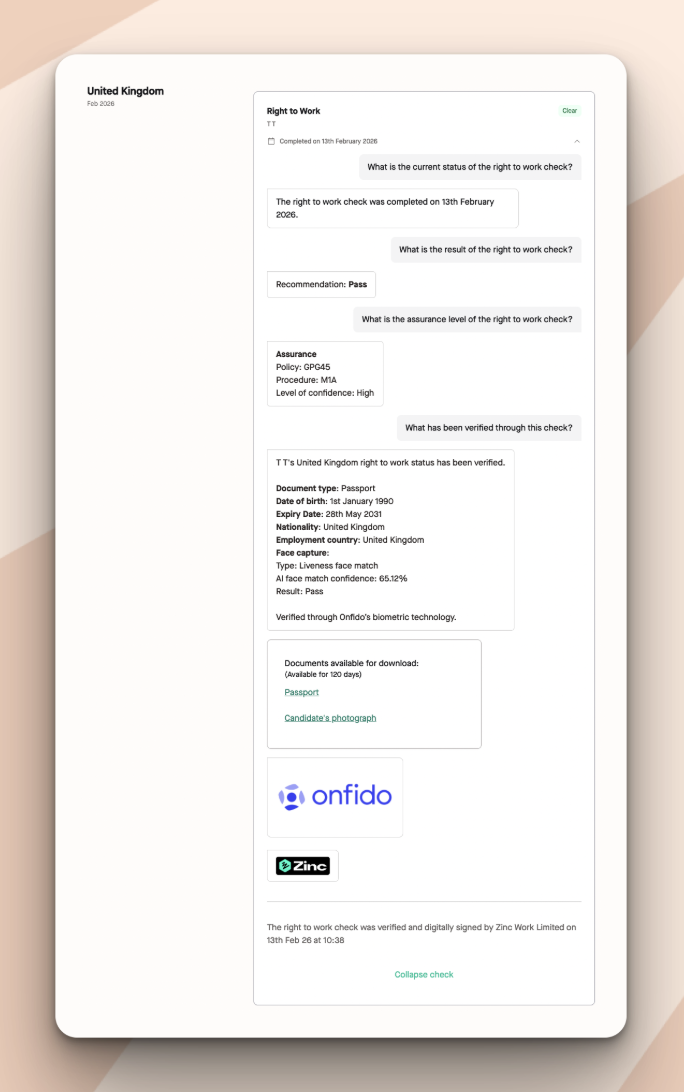
When the check is completed, you will see the below details on the candidate's report.
### Passport from the Hiring Country
The identity verification process follows government digital identity standards (such as GPG45) to provide assurance that the candidate is the legitimate holder of the identity document.
The result of the check will be **Clear** if a valid (not expired) biometric passport from that hiring country is provided and verified. However, employers should still review the results and take any additional steps required in line with their own right to work verification obligations.
It will show:
- The date it was completed or when the document was reused
- What Zinc's recommendation is for the check
- Assurance under GPG45 - Digital identity checks are scored against government identity guidance (GPG45) which you can find more information on [here](https://www.gov.uk/government/publications/identity-proofing-and-verification-of-an-individual/how-to-prove-and-verify-someones-identity). For digital right to work checks, an identity profile that achieves at least a medium level of confidence is required. If that standard is not met, you should complete a manual right to work check instead.
- What document was verified under the check along with the specific details found like the document type, expiry date, candidate's nationality, and the employment country.
- Face capture: what was captured, how confident the match is to the document provided, and the result of the facial recognition check.
- The document and selfie available for you to download and review for your imposter check.
### Share Code (Specific to UK)
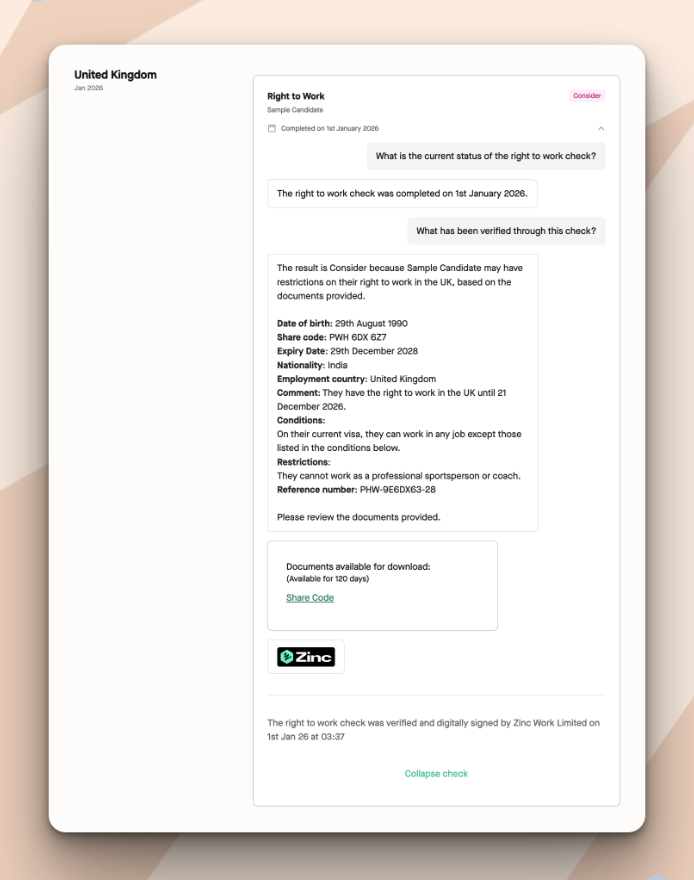
For share codes, Zinc will initially provide an indicative result based on the share code the candidate provided.
In many cases the result will be **Consider** because the Home Office response includes conditions, restrictions, or expiry dates that require employer review. Typically, there's no expiry date, restriction, or condition the result will be **Clear** (unless set specifically by the employer on Zinc to be marked as a Consider).
For candidates who provide a UK share code, Zinc displays the information supplied by the candidate so that employers can review it as part of the screening process. However, to establish a statutory excuse against illegal working penalties, **employers must conduct the check themselves using the Home Office online Right to Work service and also confirm that the individual presenting for work matches the photograph shown (an "imposter check")**. Without these, you have **not established** statutory excuse.
In order to obtain a statutory excuse against a civil penalty, you must both independently verify the individual's right to work using the official online service yourself, **and** conduct an imposter check to ensure that the share code belongs to the individual you are looking to hire.
It will show:
- The date the check was completed
- The result of the check
- The date of birth of the candidate
- The share code provided
- The expiry date (if applicable) for the share code
- The nationality provided
- The employment country
- Any comments for the share code
- Any conditions for the share code
- Any restrictions for the share code
- The reference number of the check conducted
- The PDF document of the share code check available for your review for your imposter check if needed.
## Not Verified Digitally
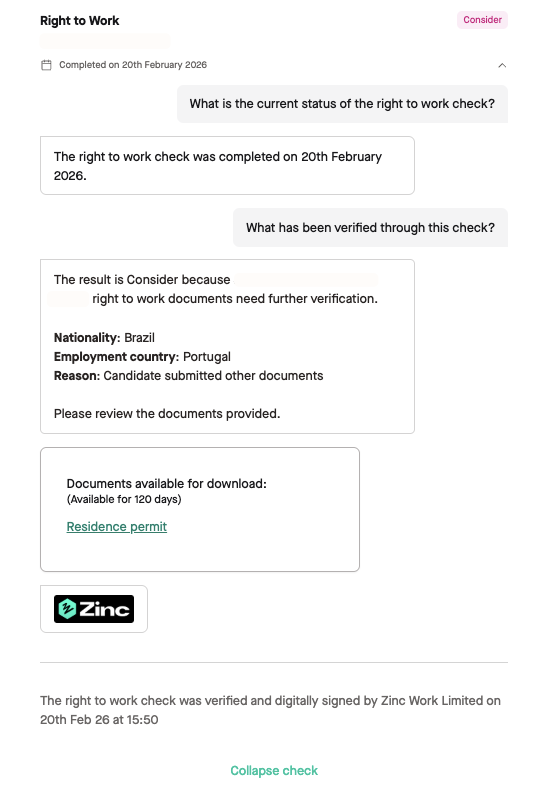
For right to work checks that cannot be verified digitally, the result will be a **Consider** result.
For example, a Portuguese right to work check when the candidate is not a citizen of Portugal, a residence permit being provided needs to be manually reviewed in order to assess whether the document demonstrates a valid right to work under local requirements like expiration dates or ensuring the candidate is legally allowed to work in the type of role.
It will show:
- The date it was completed
- Why the result is consider
- The candidate's nationality
- The employment country
- What you should do to complete the check on your side
- The document available for download for your review
## What Does Consider Mean?
For the right to work check, if you receive a **Consider** result, you will need to review the documentation provided. Zinc provides the information required for employers to assess the candidate’s right to work, but the **final** determination of eligibility remains the **employer’s responsibility**.