For the complete documentation index, see llms.txt
For the complete documentation index, see llms.txt
How to Submit a CV for a CV Check
Once you’ve enabled CV checks on a particular package, you can now request a check with CV checks.
You can find out how to request a check using our guide [here](https://help.zincwork.com/hc/hm54ky7yrc/article/b1feb366-how-to-make-a-new-request-within-zinc-and-resend-candidate-links).
After you have entered a candidate’s name and email address for the request and added any optional information, you will be prompted to add in your candidate’s CV/resume.
📌 You can only add a CV in this stage, **it cannot be uploaded once the request has been sent.**

---
For the CV upload, we can only accept PDFs.
Scanned documents that have been converted to a PDF document can also be used if it is less than 4 pages but we would recommend a genuine PDF document for the most successful uploads.

Once you have your CV file, double check that you’ve uploaded the right CV and click **Request checks.**
Congrats! Those checks have now been requested for the candidate to complete.
---
Once the CV check is complete, you will be able to view the results on the candidate's report. From within this section, you can also select **View CV** to see the candidate's CV directly, or **Download CV** to save a copy — both without leaving the report.
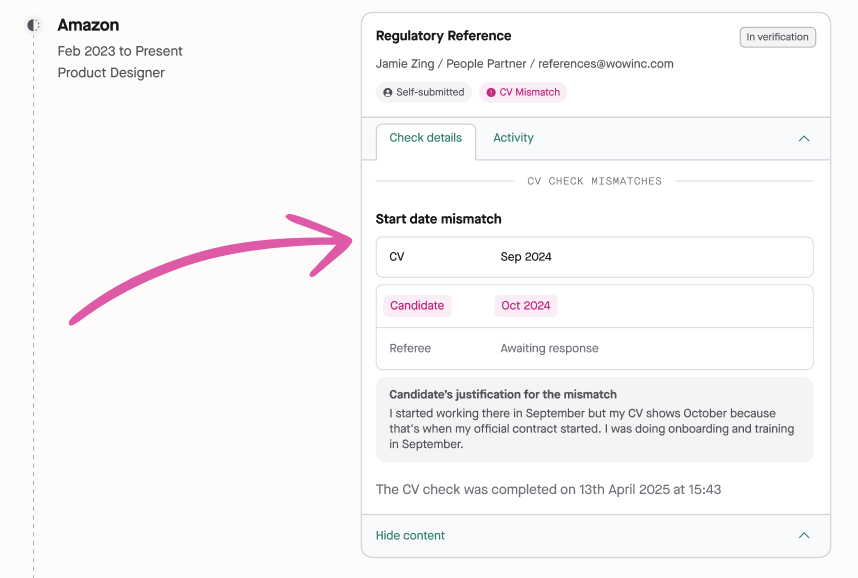
Any mismatches will be flagged with a **pink** status and it will specify which entry had a mismatch and what the mismatch was.
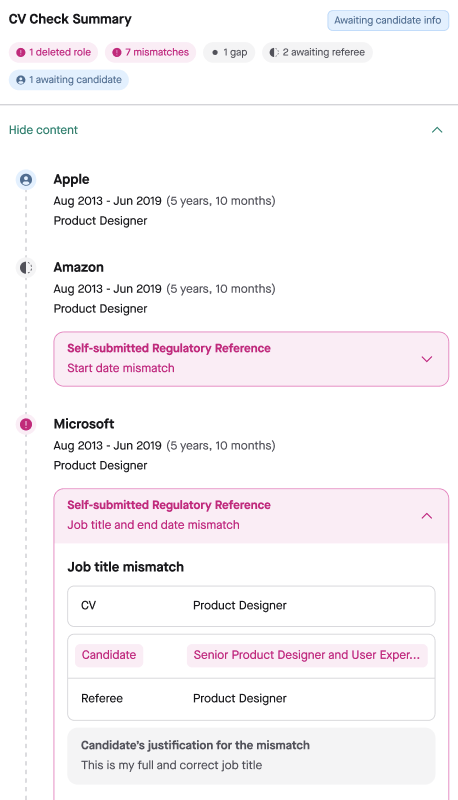
To investigate mismatches further, you can click **Jump to reference** under any **completed** CV entries to go to the exact reference with the mismatch.
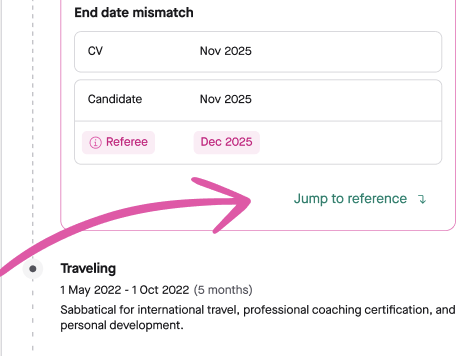
When references are completed, you will find a section inside the provided reference that provides a CV comparison to show you how the CV compares to the work history provided by the candidate as well as confirmed by their referee.