For the complete documentation index, see llms.txt
For the complete documentation index, see llms.txt
Bulk Upload Existing Employees to Zinc’s Automated DBS Update Service Rechecks
We currently capture candidates on the DBS Update Service who join via Zinc pre-employment checks.
This new feature extends that to **existing employees already on the Update Service who haven't gone through Zinc**.
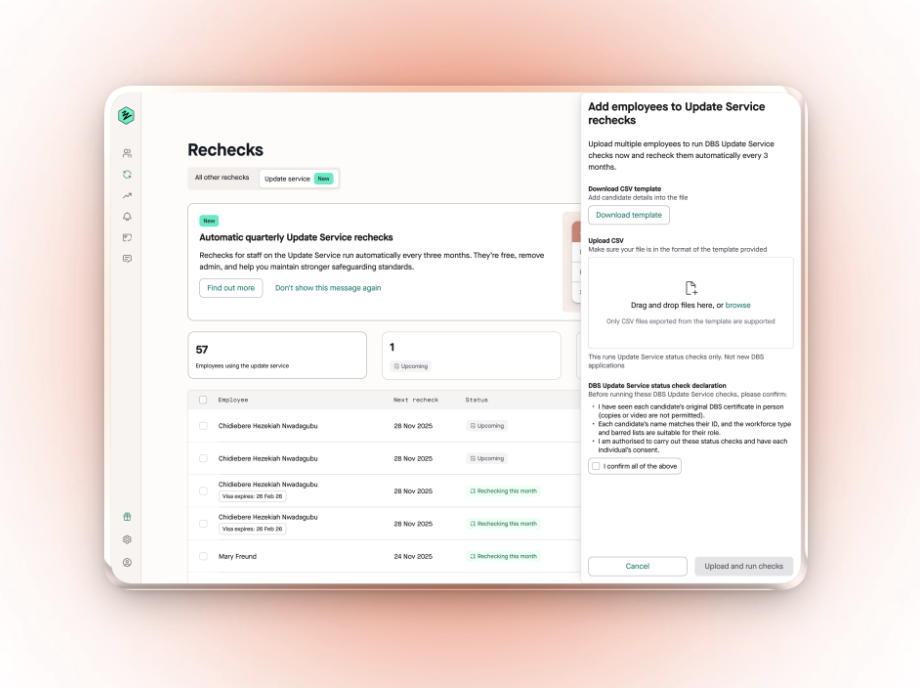
Recruiters can bulk upload these employees via a CSV file (full name, email, DOB, DBS certificate number), confirm consents, and we'll instantly run an update service check and enrol them in the automatic quarterly recheck cycle on Zinc.
## How to bulk upload employees
There will now be a new **Bulk upload** button on the Update service tab of the Rechecks page.

1. This will open a drawer with the instructions on the process
2. Download the CSV file template on Zinc
3. Complete this using the guidance on the CSV template with your employees you'd like to add into Zinc to be automatically rechecked on the Update Service
4. Upload your completed CSV back to Zinc
5. Agree to declarations listed
6. Click **Upload and run checks**