For the complete documentation index, see llms.txt
For the complete documentation index, see llms.txt
Understanding Reference Results: Clear, Consider, and Flagged Responses
## What's changed
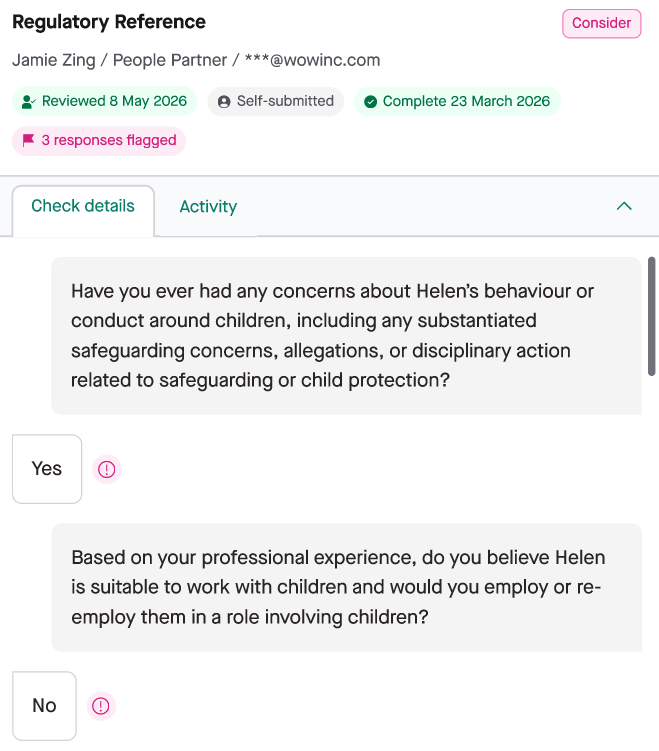
Previously, a completed reference always showed as **Clear**, even if a referee answered "yes" to a safeguarding concern or "no" to a suitability question. You had to read every response to spot a problem.
With this new feature, you can configure which answers are acceptable for each question in your package. If a referee's answer falls outside what you've set, the reference automatically shows as **Consider** and flags the specific response — so you see the concern immediately, without reading every line.
---
## Which reference types does this apply to?
All reference questionnaire types now support custom questions and answer-based flagging:
- Character
- Academic
- Regulatory
- Professional
- HR
Whether flagging works out of the box depends on the reference type and whether you're using the default questionnaire.
---
## How to configure it
### Character and Academic references
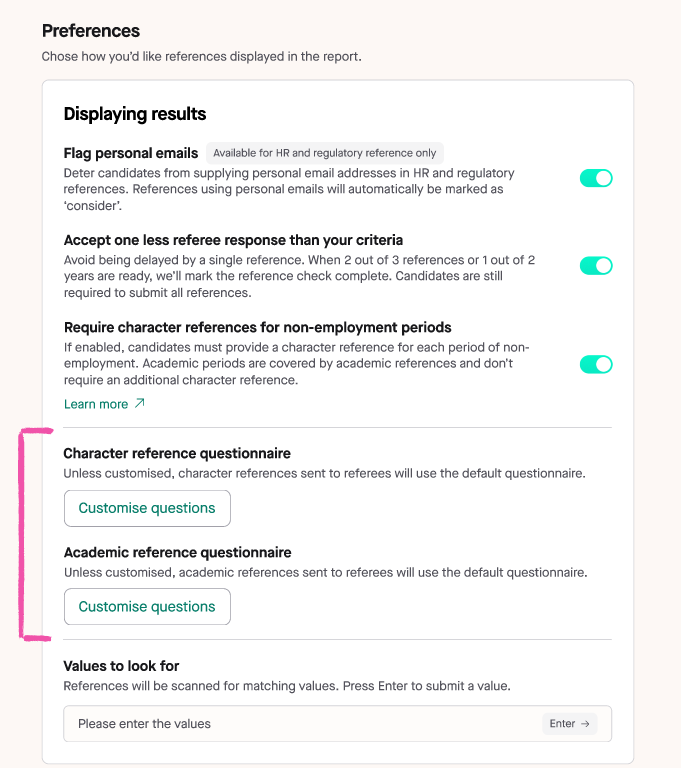
These reference types were not previously customisable, so everyone is using the default questionnaire — and the default now includes flagging. No action is needed for flagging to work. If you want to customise the questions, you can do so via **Preferences** in the package builder.
1. Open your package in the package builder.
2. Go to **Preferences**.
3. Under **Character reference questionnaire** or **Academic reference questionnaire**, select **Customise questions**.
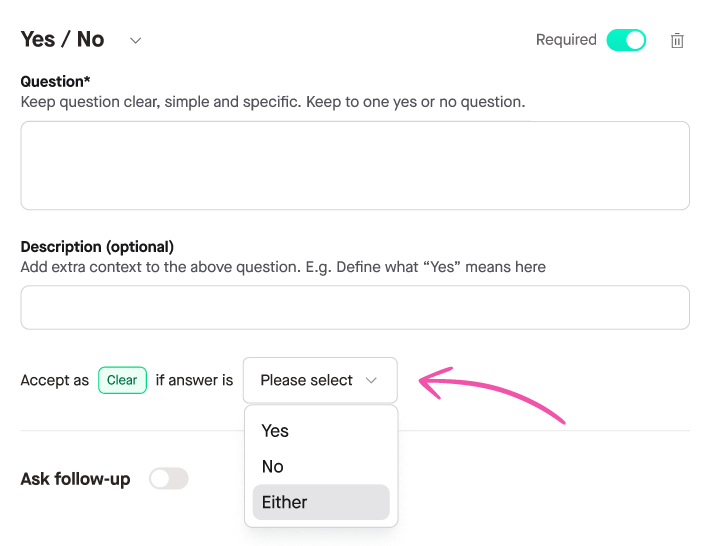
4. For each Yes/No question, set the **Accept as Clear if answer is** field to **Yes**, **No**, or **Either**.
### Regulatory references
The default regulatory questionnaire includes flagging. However, if you have already customised your regulatory questionnaire, the default flagging does not apply — you will need to open your custom questionnaire in the package builder and add **Accept as Clear** settings to your Yes/No questions manually.
### Professional and HR references
The default Professional and HR questionnaires do not include flagging. To use answer-based flagging for these types, you need to create a new questionnaire and configure the **Accept as Clear** setting on each question you want to score. Without this, no flagging will occur regardless of what the referee answers.
---
## What the default questionnaires flag
If you're using a default questionnaire, here's what flagging covers out of the box.
**Academic**
- Course outcome (e.g. degree awarded, currently studying, completed awaiting results)
- Disciplinary action during studies
- Conduct and professionalism
- Suitability for a position of trust
- Referee affirmation (answers given in good faith)
**Character**
- Suitability for a position of trust
- Referee affirmation (answers given in good faith)
**Regulatory**
- Disciplinary action (the only flagged question in the default)
- Reason for leaving is open text and is not scored
**Professional**
- No flagging in the default questionnaire. All questions are open text or multi-select with no expected answers.
**HR**
- No flagging in the default questionnaire. All questions are open text or multi-select with no expected answers.
---
## What recruiters see
When a referee's answer triggers a flag:
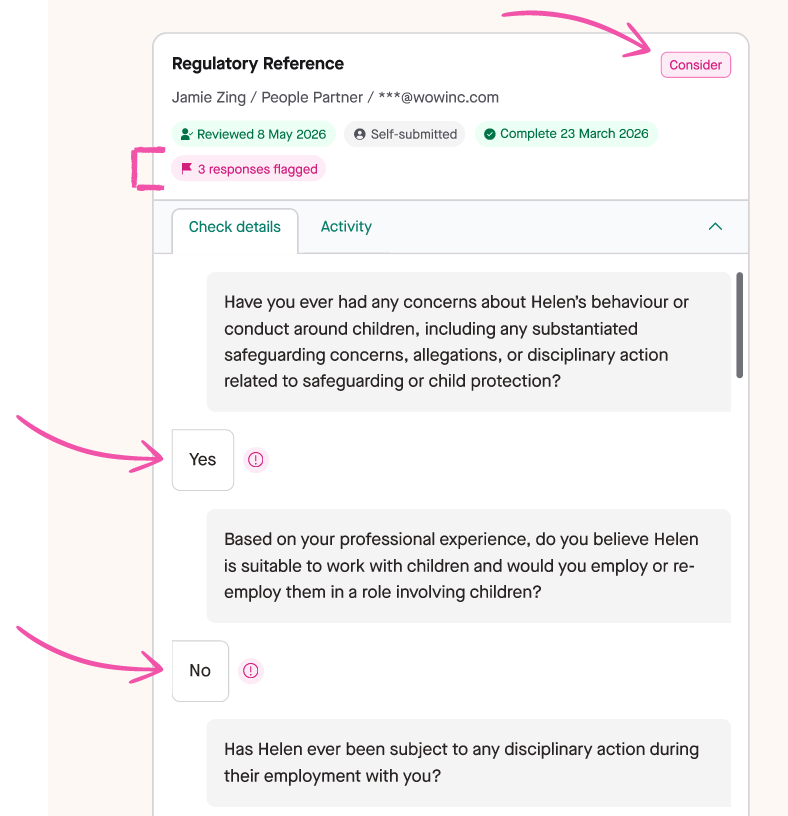
- The reference card shows a **Consider** status badge.
- A **warning flag** identifies the specific question and answer that triggered it — you don't need to scroll through the full response.
- A count shows how many responses were flagged (e.g. "3 responses flagged").
Flags also appear in the **downloaded PDF**, so your compliance record is complete.
---
## Additional Consider triggers
In addition to answer-based flagging, the following also trigger a Consider status:
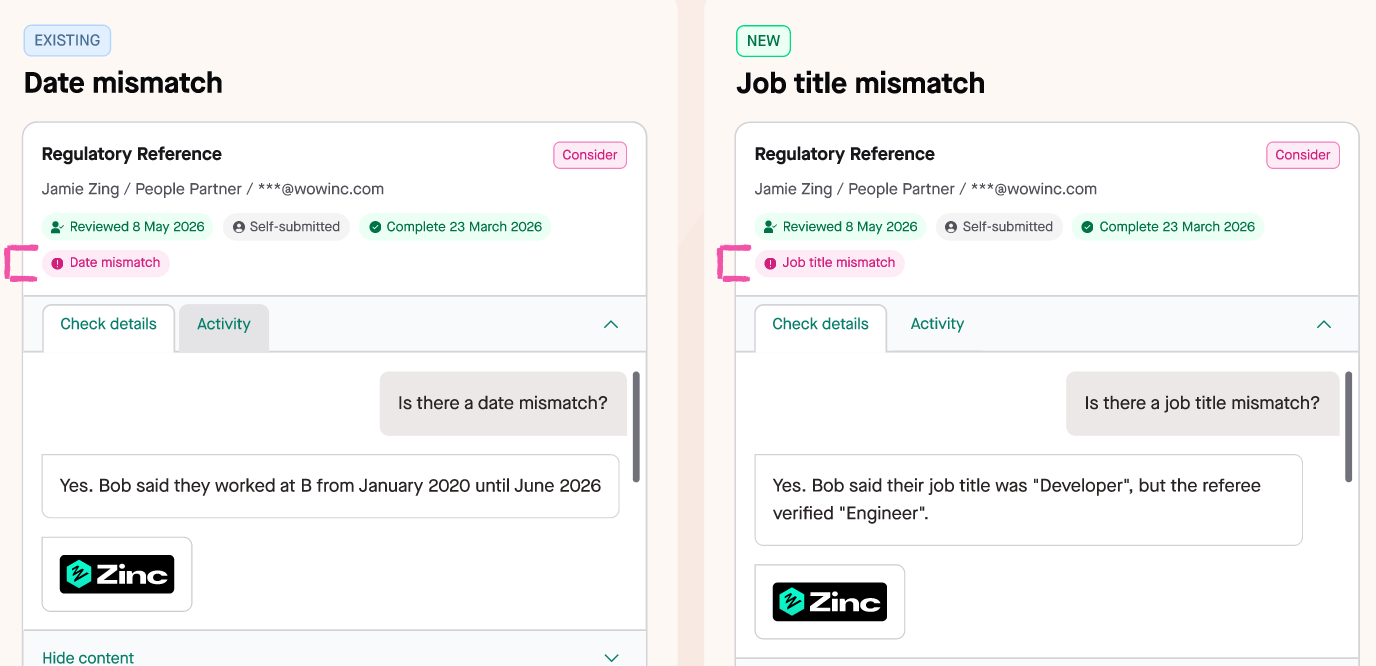
- **Date mismatch** — the dates the candidate provided don't match what the referee verified.
- **Job title mismatch** *(new)* — the job title the candidate provided doesn't match what the referee verified.
- **Personal email used** — the reference was completed using a personal email address. The reference is completed and is for your recruiter to review.
- **Full details not provided** *(new)* — the referee replied with a PDF or Word document, but our AI couldn't confirm all the required details. The original document is uploaded to the reference card for you to review.
---
## Important: this only applies to new checks
Flagging is applied at the point a referee submits their response, based on your package configuration at that time.
**This does not apply retroactively.** Checks that were completed before you updated your package will not be rescored. Only checks run after a package update will reflect the new flagging rules.
---
## FAQs
**Does this affect checks that are already complete?**
No. Flagging only applies to checks run after you update your package. Historical checks are unchanged.
**What triggers a Consider status?**
Any closed-question (Yes/No) answer that falls outside the value you set in "Accept as Clear". Free-text answers are not scored. For Professional and HR references, a Consider will only trigger if you have created a questionnaire with "Accept as Clear" configured — there is no default flagging for those types.
A reference can also show as **Consider** if it was completed using a **personal email address** if configured on your package to flag for these.
Additionally, a reference can also show as **Consider**, if our AI couldn't fully confirm all the required details from a referee-provided PDF/Word document.
**Can free-text questions be flagged?**
No. Only Yes/No questions with a configured expected answer can trigger a flag.
**Does this cover academic and character references?**
Yes. All reference questionnaire types — including academic and character (non-employment) — are now configurable in the package builder.
**Do flags appear in the downloaded PDF?**
Yes. The Consider status and per-answer flags are included in the PDF automatically.
**What if I haven't set an "Accept as Clear" value for a question on a Professional or HR reference?**
No flagging will occur. For Professional and HR references, you need to actively configure the "Accept as Clear" setting for each question you want scored. Without it, the question has no effect on the reference outcome.
**My reference has said “Consider” for several days — do I need to do anything?**
Not necessarily. If “Consider” is showing because the reference was completed using a **personal email address**, the reference is completed and is for your recruiter to review. This will be the same for if your referee replied with a PDF or Word document, but our AI couldn't confirm all the required details. No further action is required from you at the moment.
**I have a large number of packages to update — can I do this in bulk?**
If you need to update a large number of packages, contact our account management team at accountmanagement@zincwork.com or your specific account manager and we can assist with bulk updates.