For the complete documentation index, see llms.txt
For the complete documentation index, see llms.txt
Update Service Rechecks FAQs
Recently, we've released free Update Service rechecks.
Once a new employee is identified as being on the Update Service in pre-employment checks, Zinc will automatically schedule and run rechecks every three months. Zero actions are required from you or the candidate.
This feature is built for new employees that are already on the Update Service and use the Update Service in their Zinc pre-employment checks.
This automated recheck cycle is now available as well for existing employees who you know are already on the Update Service and you can learn more about this [here](https://help.zincwork.com/hc/hm54ky7yrc/article/378fc31a-bulk-upload-existing-employees-to-zincs-automated-dbs-update-service-rechecks).
---
#### How does Zinc identify which candidates are on the Update Service versus those who aren’t?
Candidates are asked in the pre-employment checks if they are on the Update Service. Once they say Yes, they are asked to input their details into Zinc and rechecks are run automatically each quarter.
You can also bulk upload existing employees that you know are on the Update Service and those will automatically be rechecked using their details each quarter.
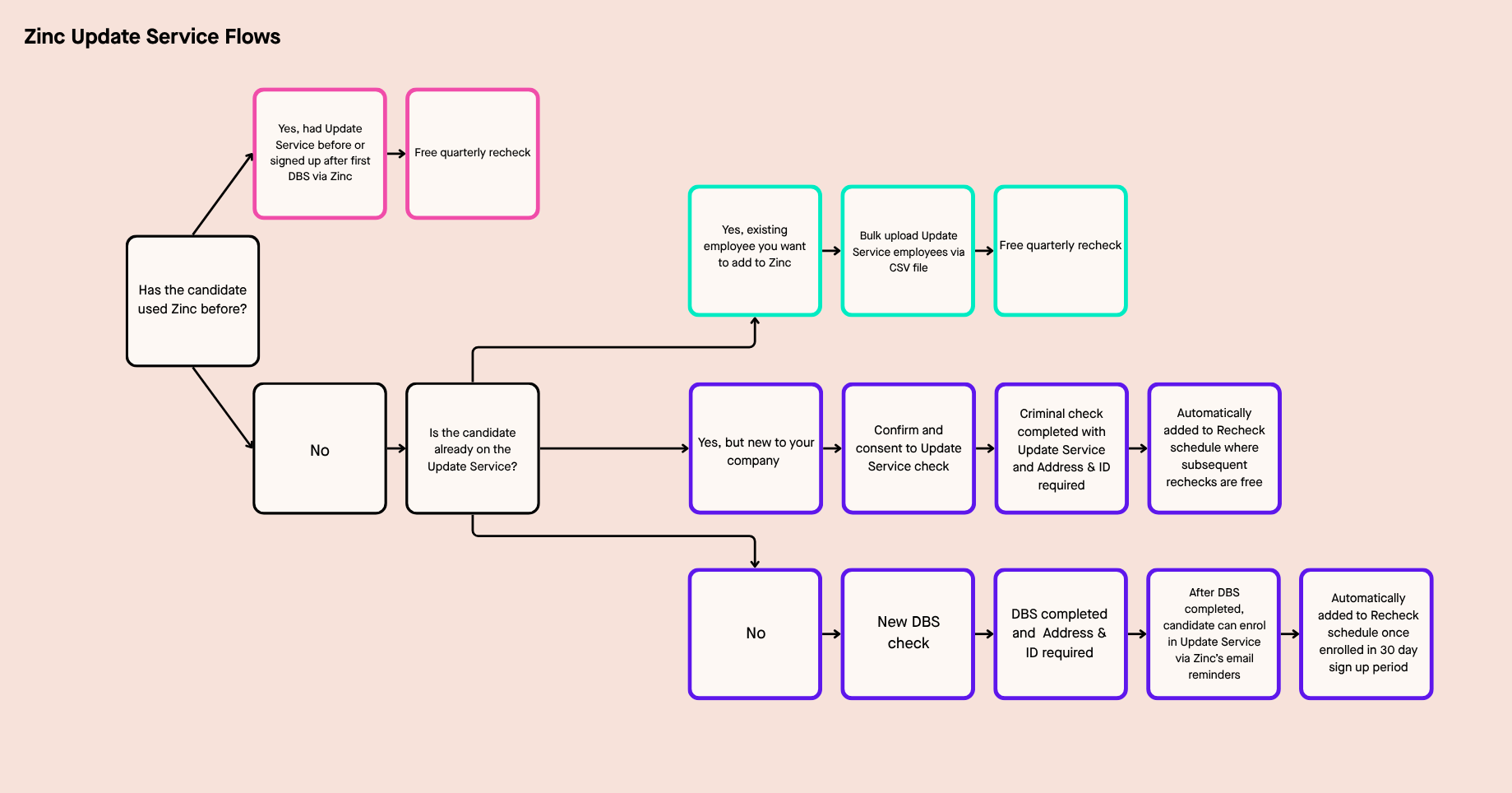
Below is a diagram showing the different Update Service recheck flows that exist in Zinc.
#### Does this apply to existing candidates already on my account, or only to candidates added in the future?
The automated quarterly recheck flow applies only to candidates added in the future after this release (January 22nd 2026).
If you did a bulk upload of existing employees on the Update Service using the new feature highlighted [here](https://help.zincwork.com/hc/hm54ky7yrc/article/378fc31a-bulk-upload-existing-employees-to-zincs-automated-dbs-update-service-rechecks), this upload would instantly run an update service check and enrol them in the automatic quarterly recheck cycle on Zinc.
#### What reminders does Zinc send to candidates/employees to encourage them to join the Update Service?
We send 2 reminders, 15 days after check completion and another one 28 days after the DBS completion date to encourage candidates to join the Update Service.
Candidates also get a reminder email from the Update Service directly when their subscription is up for renewal.
#### What notifications does the employer receive?
As soon as the first candidate in your account uses the Update Service, you'll see a new tab appear on your Rechecks page called **Update service**.
There, you'll be able to see all the candidates that have used the Update Service and all the rechecks that are scheduled. You'll get the same outputs and notifications as regular rechecks.
You'll get a report for each check shown on your Request page, and any users attached to that candidate that have notifications set up also receives notifications about each report.
#### What happens if an employee on the Update Service doesn’t renew their subscription?
We will send you an email and display on the recheck table a **Subscription expired** tag
#### If we are using an integration, will it upload a report to the employee file every 3 months with the results of the recheck?
Yes, it operates the same as rechecks do in any of our integrations that allow rechecks.
---
Find out more on this new feature through this video [here](https://share.synthesia.io/beb63e2c-9ae1-4c13-a0ff-c81b3668e5d9).