For the complete documentation index, see llms.txt
For the complete documentation index, see llms.txt
Processing Candidates Using the DBS Update Service: Steps and Result Interpretation
## What is the Update Service?
The Update Service is an online subscription that lets employers carry out a instant online check to view the status of an existing standard or enhanced DBS certificate.
For an annual subscription of £15, an individual can take their certificate with them from role to role (if within the same workforce, and where the same type and level of certificate is required).
### Viewing the Update Service result
To view a candidate’s Update Service result, employers must follow three key steps:
1. **Review the Certificate in Person.** The original paper DBS certificate needs to be reviewed in person, not just over a video link or a copy of the certificate.

1. **Verify Candidate Information**: Ensure the candidate's name matches their ID, and confirm that the workforce type and barred list(s) on their current DBS certificate are appropriate for the new role.
The DBS certificate scope must match what the role requires (for example, whether it covers **children**, **adults**, or **both**). For example, if the role requires **children-only** but the certificate is for **children and adults**, it won’t be suitable for using the Update Service.
The original paper DBS certificate needs to be reviewed in person, not just over a video link or a copy of the certificate.
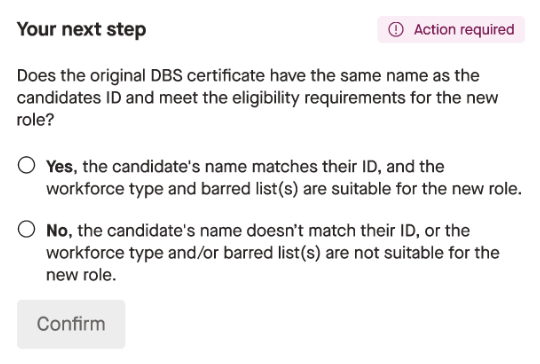
2. **Complete the Update Service Declaration**: This step ensures compliance, confirming the employer’s eligibility to check the candidate’s criminal record.
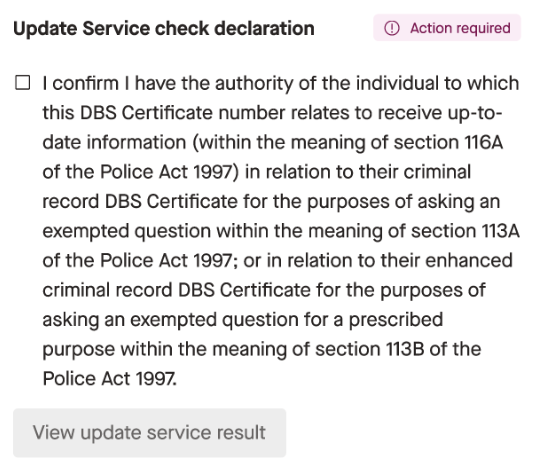
3. **View the Result**: After completing the above steps, you can view the Update Service result to determine the status of the candidate’s DBS certificate. 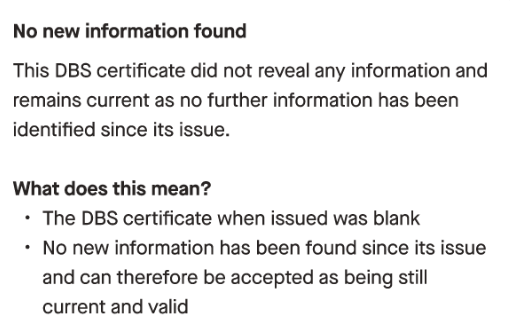
### What happens if the candidate's details don’t match?
If you confirm that the candidate's name doesn’t match their ID, or the workforce type and/or barred list(s) are not suitable for the new role, the candidate will need a new Enhanced DBS.
This also applies if the certificate scope does not match the role requirements (for example, a role requiring **children-only** but the certificate covers **children and adults**).
Zinc will automatically send a new Criminal check for the candidate complete.
### What results do we get and what do they mean?
There are three results we get back from the Update Service.
**No new information**
This DBS certificate did not reveal any information and remains current as no further information has been identified since its issue.
What does this mean?
- The DBS certificate when issued was blank
- No new information has been found since its issue and can therefore be accepted as being still current and valid
**Disclosed information, remains valid**
This DBS certificate remains current as no further information has been identified since its issue.
What does this mean?
- The DBS certificate revealed information about the person
- No new information has been found since its issue and can therefore be accepted as being still current and valid
**New information found**
This DBS certificate is no longer current. Please apply for a new DBS check to get the most up-to-date information.
What does this mean?
- New information has come to light since the DBS certificate was issued and you will need to apply for a new DBS check to see this new information
Zinc will automatically send a new Criminal check to the candidate.
## How will I know when I need to action the report?
Once the candidate has submitted their update service check you’ll get an email to notify you that you need to take some actions. If you miss that email, you can view the progress of checks from the **Check progress** panel on the candidate report. This panel will highlight what action you need to take. This action is only available for Admins and Recruiter user roles to complete.

Read more about your candidate's journey [here](https://help.zincwork.com/hc/hm54ky7yrc/article/8bfc140e-using-your-update-service-subscription-with-zinc).